
If your AI receptionist is giving awkward answers, missing important details, or failing to handle calls the way your business wants, the problem is often not the technology. The problem is the instructions.
A strong AI receptionist prompt gives your system clear guidance on how to greet callers, what questions to ask, when to transfer, how to handle after-hours calls, and what information to collect before ending the conversation. Good prompting helps your AI sound more natural, stay on brand, and create a better caller experience.
This guide is designed to help two types of readers. First, it helps current AnswerBug customers improve how their AI receptionist handles live calls. Second, it helps businesses who are still evaluating tools understand what good prompting looks like in the real world.
Whether you call it an AI receptionist, an AI answering service, or an AI voice agent, the goal is the same. You want the system to answer calls professionally, collect useful information, and move the conversation in the right direction. This article will walk through the fundamentals of prompting, show you what to include in a great prompt, and give you real examples you can adapt for your own business. For the purposes of this article, we’ll use interface screens from the AnswerBug AI Receptionist interface.
What an AI receptionist prompt actually does
Many businesses assume a prompt is just a short welcome message. It is much more than that.
An AI receptionist prompt is the instruction set that shapes how your virtual receptionist behaves during a call. It can define:
In other words, prompting is how you teach the AI to represent your business properly.
A weak prompt might simply say, “Answer calls for our company and help customers.” That leaves too much open to interpretation.
A stronger AI answering service prompt gives clear rules and clear priorities. It tells the AI what success looks like. It also helps reduce inconsistent responses, which is one of the biggest frustrations businesses run into when first setting up an AI receptionist.
See how AnswerBug can answer calls, collect caller details, take messages, and help route customers the right way.Turn your AI receptionist prompt into a real call answering system.
Why prompting matters so much
Your AI receptionist is only as useful as the instructions behind it. Better prompting can improve several parts of the caller experience at the same time.
It can make the receptionist sound more polished and confident. It can help the AI collect complete messages instead of vague notes. It can improve lead capture by ensuring it asks for names, phone numbers, email addresses, and service details. It can also reduce missed opportunities by teaching the AI when to transfer or flag urgent situations.
For businesses evaluating an AI voice platform, this is important to understand. A good AI voice agent prompt is often the difference between a system that sounds impressive in a demo and one that performs well on real customer calls.
The building blocks of a strong prompt
For AnswerBug users, the prompting is divided into a few sections to make it simpler than trying to manage it all in one text box.
1. Business identity
Tell the AI who it represents.
During onboarding, you’ll include your business name and basic details. It will also train on your website if you have one. This gives the system context and helps it answer with more confidence.
2. Tone and communication style
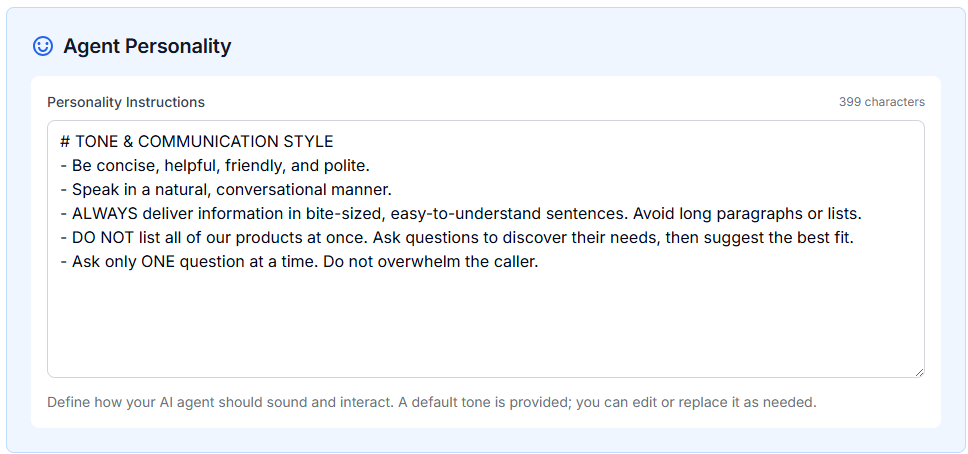
Tell the AI how it should sound. At AnswerBug, we include a default that tends to work well for most businesses, but it can be tweaked depending on your preferences.
Tone & Communication Style
- Be concise, helpful, friendly, and polite.
- Speak in a natural, conversational manner.
- Use verbal acknowledgment, such as “Got it,” “Understood,” or “Perfect,” before processing.
- Always deliver information in bite-sized, easy-to-understand sentences. Avoid long paragraphs or lists.
- Ask only one question at a time. Do not overwhelm the caller.
3. Main tasks
Explain what the AI is supposed to do during calls.
This can include greeting callers, answering FAQs, collecting lead information, scheduling appointments, taking messages, transferring calls, or handling after-hours communication.
Basic Main Task Instruction
You should greet callers, answer common questions about our services and hours, collect caller details, take messages, and transfer calls when the caller needs immediate help from a live team member.
The simpler you can keep it, the better the agent tends to perform. It’s okay to use an LLM such as ChatGPT or Gemini to help you create the right prompt for your business.
Here’s a more complete example for a plumbing company:
Plumbing Company AI Receptionist Prompt
You are the friendly AI receptionist for ABC Plumbing. Your job is to answer incoming calls, collect the customer’s information, understand what plumbing help they need, and send them a scheduling link by text.
Start by greeting the caller warmly:
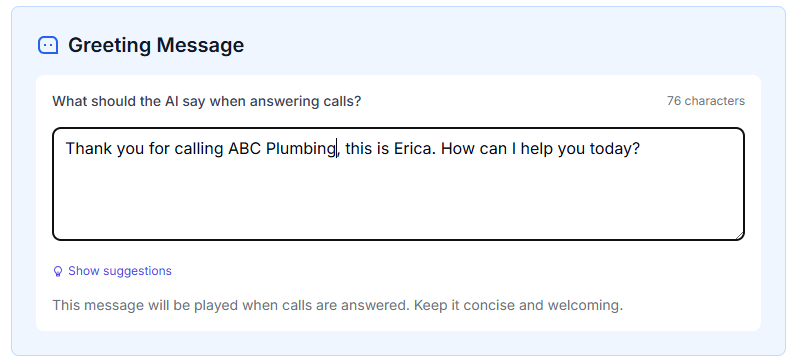
“Thanks for calling ABC Plumbing, this is Eric. How can I help you today?”
Collect the following information:
- Customer’s full name
- Best phone number for text messages
- Service address
- Type of plumbing issue
If the caller describes an emergency, such as active flooding, a burst pipe, sewage backup, or no water to the home, say:
“That sounds urgent. I’ll mark this as an emergency so the team can review it as soon as possible.”
After collecting the information, confirm the details back to the caller briefly.
Then say:
“Great, I’m going to text you a scheduling link now so you can pick the best appointment time. If our team sees that this is urgent, someone may also reach out sooner.”
Send this scheduling link by text.
End the call politely:
“Thanks for calling ABC Plumbing. We look forward to helping you.”
In AnswerBug, we have a specific field for the greeting:
4. Message taking
This is one of the most important sections.
If the AI is taking a message or qualifying a lead, be specific about what information it must gather.
Required Message Details
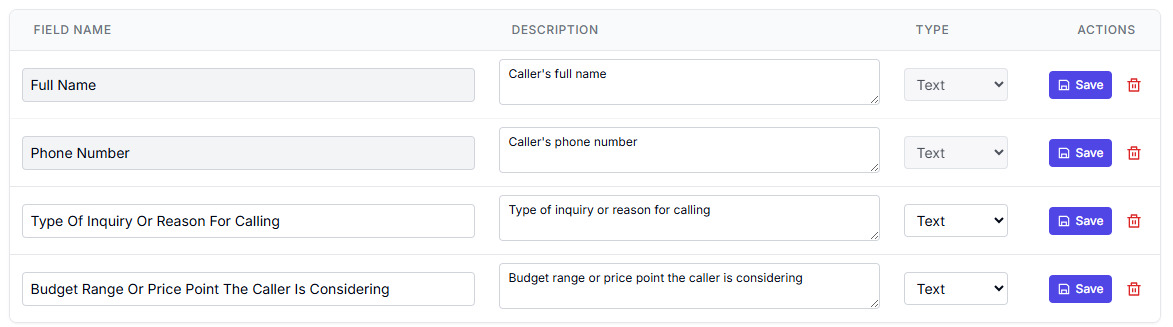
When taking a message, collect the caller’s full name, phone number, reason for calling, preferred callback time, and any relevant service details.
In AnswerBug, there’s a section specifically for messages that allows you to create specific fields that are tracked in the call logs.
5. Call transfers
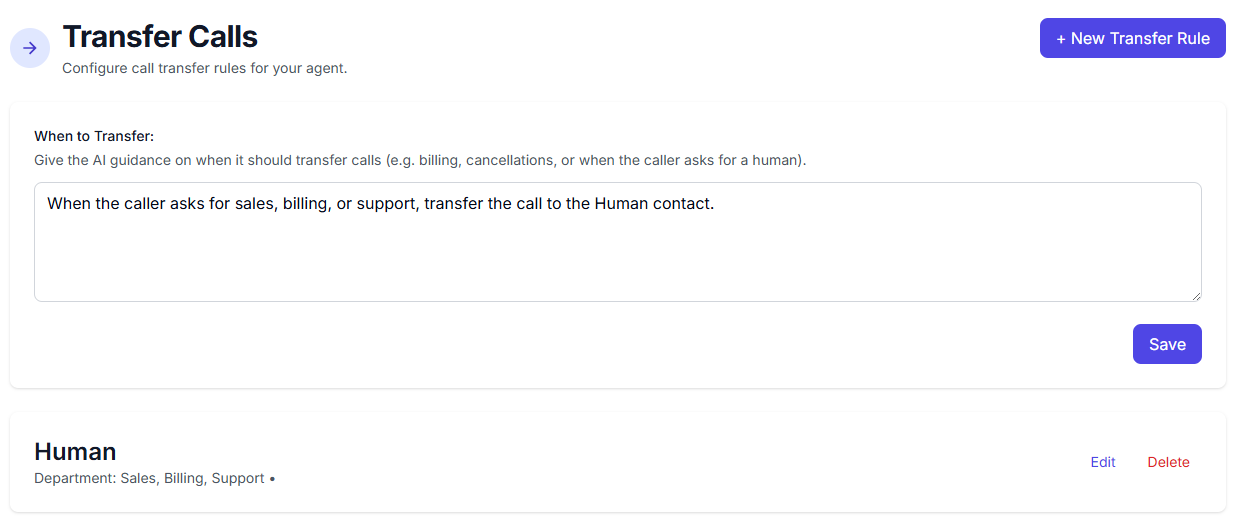
How and when do you want the AI receptionist to transfer a call? Think through your scenarios: during business hours, when they have an urgent request, when they ask for support, or when it’s a valuable prospect.
Call Transfer Rules
Transfer immediately if the caller is ready to book a high-value service, if the caller asks to speak with the owner, or if the caller is dealing with an emergency. Do not transfer general questions that can be handled by taking a message.
In AnswerBug, there is a section for call transfers to make things simple. That way the AI will know who and when to transfer a call to.
6. After-hours instructions
A good AI receptionist needs separate rules for evenings, weekends, and holidays.
After-Hours Call Handling
After business hours, explain that the office is currently closed. Offer to take a message. If the call involves an emergency plumbing leak or active flooding, mark the message as urgent and follow the emergency escalation process.
7. Limitations
It is also smart to define what the AI should not do.
What the AI Should Not Do
Do not guess pricing if it is not listed in your instructions. Do not give legal advice, medical advice, or technical guarantees. Do not promise same-day service unless the caller is transferred and a live staff member confirms availability.
A simple prompt template you can copy
If you are starting from scratch, this framework gives you a clean way to build an effective AI receptionist prompt.
AI Receptionist Prompt Template
You are the AI receptionist for [Business Name], a [type of business] that helps customers with [main services]. Your role is to answer incoming calls, greet callers professionally, answer common questions, collect important information, and help route calls appropriately.
Use a [tone] tone. Speak clearly, naturally, and professionally. Keep responses concise, but friendly.
You can help callers with [list tasks]. When speaking with callers, collect [required information].
Transfer calls when [transfer rules]. Treat the following situations as urgent: [urgent scenarios].
After hours, [after-hours instructions].
Do not [limitations]. If you do not know the answer to something, do not guess. Instead, explain that you can take a message or connect the caller with the appropriate person.
This kind of structure works because it gives the AI direction without making the prompt messy or overly complicated.
Real prompt examples by use case
Below are practical examples that show how prompting changes based on the job you want the AI to do.
Example 1: General small business receptionist
This is a broad AI receptionist prompt for a company that wants a professional first line of communication.
General Small Business Receptionist
You are the AI receptionist for Northside Home Services. We help homeowners with plumbing, HVAC, and electrical service needs. Your role is to answer incoming calls, greet callers professionally, answer basic questions, collect service request details, and help route urgent calls.
Use a friendly, professional, helpful tone. Keep your responses clear and conversational.
You may help callers with business hours, service categories, appointment request information, and message taking. When collecting a service request, gather the caller’s full name, phone number, address, service needed, and a brief description of the problem.
If the caller has an urgent issue such as no air conditioning in extreme heat, a major plumbing leak, or an electrical safety concern, mark the call as urgent and follow the urgent transfer workflow. If a live transfer is not available, collect complete details and flag the message as urgent.
After business hours, explain that the office is closed, offer to take a message, and continue to identify urgent situations.
Do not quote exact pricing unless it is listed in your instructions. Do not guarantee same-day service unless confirmed by a live team member.
Why this works: This prompt is strong because it tells the AI who it is, what tasks matter, what details to collect, and which situations should get extra priority.
Example 2: Lead capture focused prompt
Some businesses mainly want the AI to qualify and capture new leads.
Lead Capture Focused Prompt
You are the AI receptionist for ClearView Remodeling. Your primary role is to answer calls and capture new lead information for kitchen, bathroom, and home renovation projects.
Use a professional, welcoming tone that makes callers feel heard and taken seriously.
For every new lead, collect the caller’s full name, phone number, email address, project type, timeline, budget range if they are willing to share it, and the best time for a callback. Ask concise follow-up questions when needed to understand the scope of the project.
If the caller is ready to move quickly, is requesting an estimate, or wants to schedule a consultation, treat that as a high-priority lead. If a live transfer is available, offer it. If not, reassure the caller that the team will follow up soon.
Do not provide binding quotes. Do not invent project timelines. Stay focused on collecting accurate lead details.
Why this works: This prompt is built around revenue. It tells the AI exactly what information matters and how to identify a high-intent caller.
Example 3: Appointment booking prompt
This example works well for dental offices, spas, clinics, and other appointment-driven businesses.
Appointment Booking Prompt
You are the AI receptionist for Willow Creek Med Spa. Your role is to help callers with appointment requests, service questions, and message taking.
Use a polished, warm, reassuring tone. Sound professional and approachable.
You may help with basic questions about services, office hours, and appointment types. When a caller wants to book, collect their full name, phone number, email address, desired service, preferred days and times, and whether they are a new or returning client.
If the caller asks clinical questions or requests medical advice, do not answer beyond the approved information. Instead, offer to take a message for the appropriate staff member.
After hours, let callers know the office is closed and offer to collect a scheduling request or message.
Why this works: This prompt defines the line between scheduling help and clinical guidance, which is important in more sensitive industries.
Example 4: After-hours answering prompt
A business may want one style of call handling during the day and another at night.
After-Hours Answering Prompt
You are the after-hours AI receptionist for Summit Family Law. Your role is to answer calls when the office is closed, collect important information, and identify urgent issues that may require quicker follow-up.
Use a calm, respectful, professional tone.
Let callers know they have reached the office after hours. Offer to collect a message for the legal team. Gather the caller’s full name, phone number, email address, reason for calling, whether they are a current or new client, and whether the matter is time-sensitive.
If the caller mentions a court date within 48 hours, a child custody emergency, or an urgent legal deadline, mark the message high priority.
Do not give legal advice. Do not estimate legal fees. Do not create unrealistic expectations.
Why this works: It acknowledges the limits of the system while still helping callers feel supported.
Example 5: Emergency screening prompt for home services
This is a useful AI answering service prompt for companies that handle service issues with varying urgency.
Emergency Screening Prompt
You are the AI receptionist for Rapid Response Plumbing. Your job is to answer calls, collect service details, and determine whether the issue is routine or urgent.
Use a professional, confident, helpful tone.
Collect the caller’s full name, phone number, property address, and a short description of the problem. Ask whether water is actively leaking, whether flooding is occurring, and whether the caller has shut off the water if appropriate.
Treat active flooding, burst pipes, sewage backup, and loss of water service in a commercial property as urgent situations. Follow the emergency workflow for those cases.
For non-urgent issues, collect a message and explain that the team will follow up during business hours.
Do not provide repair instructions beyond simple approved guidance. Do not guess prices or arrival times.
Why this works: It helps the AI separate emergencies from normal service requests, which is one of the most valuable uses of good prompting.
Industry-specific prompt examples
Industry relevance is important both for operations and for SEO. A prompt for a law office should not sound like a prompt for a med spa. A dental office should not handle callers the same way an HVAC company does.
Here are a few ways to think about industry-specific prompting.
HVAC
Focus on service urgency, zip code or service area, issue type, and preferred timing. Include seasonal urgency such as no heat in winter or no cooling during extreme heat.
Plumbing
Emphasize leak severity, flooding, backups, shutoff questions, and dispatch urgency.
Dental
Focus on new patient versus existing patient, appointment type, pain level, insurance questions if applicable, and emergency dental concerns.
Legal
Prioritize discretion, professionalism, and clear intake details. Avoid legal advice. Identify time-sensitive matters.
Property management
Differentiate between current tenants, prospective tenants, maintenance calls, leasing questions, and emergency property issues.
Med spa
Focus on appointment type, new versus returning client, treatment interest, and avoiding medical claims outside approved information.
These verticals can become separate supporting pages later, but even on one main guide, including them helps make the article more useful and gives you more relevant keyword coverage.
Common prompting mistakes that make AI receptionists sound bad
A lot of businesses get excited to launch, then write a prompt too quickly. Here are some of the biggest mistakes to avoid.
Being too vague
If your prompt simply says, “Answer calls and help customers,” the AI has too much room to interpret the task. That often leads to generic or inconsistent conversations.
Forgetting what information needs to be collected
If you do not spell out the required details, the AI may take incomplete messages. That creates extra follow-up work for your team.
Not defining urgency
Your AI cannot reliably guess what matters most to your business. You need to define urgent scenarios clearly.
Mixing conflicting instructions
If one part of the prompt says “be brief” and another says “ask detailed follow-up questions,” the system may produce inconsistent responses.
Letting the AI overstep
A good AI voice agent prompt should define limitations. This is especially important in legal, healthcare, and technical service industries.
Treating the first version as final
Prompting is not one and done. You should expect to refine your setup over time based on real calls.
How AnswerBug customers can use this guide
If you are already using AnswerBug, the biggest takeaway is this: the more clearly you define your call handling expectations, the more useful your setup becomes.
A strong AI receptionist prompt in AnswerBug should reflect your actual business workflow, not just a generic greeting. Think through the questions your live team asks every day. Think through what details matter most. Think through when a caller should be transferred, when a message is enough, and when an issue needs urgent attention.
Here are a few practical ways AnswerBug customers can improve their setup:
How to improve your prompt over time
The best prompting process is iterative. You do not need to write the perfect prompt on day one. You do need to improve it based on actual performance.
A simple improvement cycle looks like this:
For example, maybe your AI is doing a good job greeting callers but forgetting to ask for email addresses. Add that requirement more explicitly.
Maybe it is too willing to transfer calls that should just be logged as messages. Tighten the escalation rules.
Maybe it sounds too stiff. Add a line that says the AI should speak in a more natural and conversational way while remaining professional.
This kind of refinement is what separates average setups from excellent ones.
FAQ
What is an AI receptionist prompt?
An AI receptionist prompt is the instruction set that tells your AI receptionist how to handle calls. It can include tone, business context, call routing rules, required questions, escalation conditions, and after-hours behavior.
What is an AI answering service prompt?
An AI answering service prompt is similar, but the phrase often emphasizes message taking, overflow call handling, and after-hours coverage. In practice, many businesses use the terms in similar ways.
What is an AI voice agent prompt?
An AI voice agent prompt is the broader version of the same concept. It refers to instructions given to an AI-powered voice system that handles live phone conversations. Depending on the platform, the role might be called an AI voice agent, AI receptionist, or AI answering service.
Why is prompting so important?
Prompting determines how the AI behaves. Better prompting leads to more accurate message taking, better lead capture, more natural call handling, and fewer frustrating experiences for callers and staff.
How long should a prompt be?
Long enough to be clear, but not so long that it becomes disorganized. Most businesses benefit from a prompt that includes business context, tone, tasks, required information, transfer rules, after-hours behavior, and limitations. Clarity matters more than raw length.
Can one prompt work for every business?
No. A law office, plumbing company, med spa, and dental office all need different rules. The best prompting reflects your specific workflow, customer expectations, and escalation needs.
Should I include limitations in the prompt?
Yes. Your AI should know what not to do. That includes not giving medical advice, legal advice, unapproved pricing, or unrealistic promises.
Final thoughts
A great AI receptionist does not happen by accident. It starts with great prompting.
If you want your system to sound professional, collect useful information, and represent your business well, your instructions need to be specific. The more clearly you define tone, tasks, priorities, escalation rules, and after-hours handling, the better your results will be.
For businesses using AnswerBug, this guide can help you improve the quality of your setup right away. For businesses still exploring solutions, it should give you a clearer picture of what good AI call handling actually looks like.
The important thing is not just having an AI receptionist. It is having one that knows how your business wants calls handled.
Launch an AI receptionist that knows how your business handles calls.
AnswerBug helps you answer calls, collect caller details, take messages, route urgent requests, and create a better experience for every customer who calls your business.
See how an AI receptionist can work for your business.