Quit Juggling & Start Managing
Being the boss is tough, especially if you’re managing a call center with phone dialer software. It’s your responsibility to ensure high agent performance, deliver exceptional customer service, keep leads organized, and generate quality reports. You are also tasked with balancing the finite resources you’re equipped with. Nearly everything you do must be time-efficient and cost-effective.
So, how on earth do you perform this juggling act? Should you join the circus? Probably. But what you should really do is manage your call center with campaigns.
Call center campaigns are focused efforts that break down your calling into organized segments so your team can better create opportunities, capitalize on leads, generate more sales, and provide better service. With Dolphin Power Dialer, campaigns help you organize your calling efforts around the way your team actually works.
Why are Call Center Campaigns Important?
Call center campaigns give you increased flexibility to organize different levels of your call center. Different businesses have different needs — some are simple, some are complex. Campaigns can be conducted in a variety of ways, including outbound campaigns, inbound campaigns, blended campaigns, sales campaigns, appointment-setting campaigns, follow-up campaigns, and customer service campaigns.
With campaigns, you can also keep track of results and determine which practices are the most effective. This is especially important when you are calling different types of leads, working multiple lists, assigning agents to different goals, or trying to understand which calling strategy produces the best outcome.
Organize Leads
Group campaigns by list type, location, client, offer, follow-up stage, or business goal.
Guide Agents
Use campaign-specific scripts, caller IDs, dispositions, and transfer presets.
Track Results
Review call activity, agent performance, contact rates, and campaign outcomes.
Great reasons to use call center campaigns include better organization, cleaner reporting, more effective use of each agent’s talents, better lead follow-up, more consistent scripts and caller IDs, and increased productivity.
Setting Up Effective Campaigns in Dolphin
There are multiple ways to set up a call center campaign depending on the needs of your call center. The most important thing is to think about the purpose of each campaign before you begin changing settings or loading leads.
Here are a few basic strategies for dividing up your campaigns:
- By location of leads for time zone and caller ID purposes
- By list type, such as warm leads, cold leads, or follow-up leads
- By product, service, offer, or appointment type
- By agent skill set or sales experience
- By inbound, outbound, or blended call type
- By client, if your call center handles work for multiple businesses
In Dolphin, a campaign can be built around the specific way you want agents to call. Managers can create and update campaigns, assign lead lists, choose a dial mode, add a script, set a caller ID, turn on campaign recording, manage dispositions, and add transfer numbers for agents to use during calls.
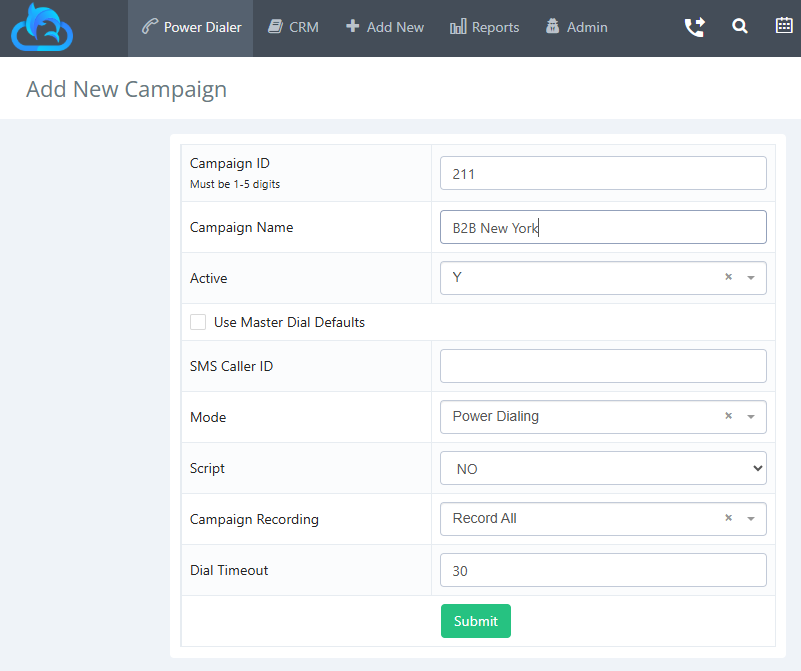
When creating a Dolphin campaign, you can use master dial defaults to quickly copy your standard settings into a new campaign, or you can customize the campaign manually. You can add a campaign ID, campaign name, caller ID, dial mode, script, recording setting, and more. You can also keep campaign organization clean by turning campaigns active or inactive depending on whether agents should see them in the power dialer.
It is always a good idea to test different settings and figure out which campaign gathers the best results or is most optimized for the goal you are trying to achieve.
Managing Outbound Campaigns with Dolphin Power Dialer
In outbound campaigns, agents make calls from a lead list within a campaign. This is where Dolphin Power Dialer shines.
A power dialer helps agents make outbound calls at their own pace without manually entering every phone number. The system calls numbers from a predefined phone list, presents the prospect’s information on the screen, and allows the agent to speak with the contact immediately after they answer. If the number is disconnected, busy, or unattended, the agent can quickly move on and continue working through the list.
Power Dialer vs. Predictive Dialer
A predictive dialer uses an algorithm to call multiple numbers and connect answered calls to available agents, which can create delays, abandoned calls, or dropped-call compliance concerns. Dolphin Power Dialer is built around agent-controlled, campaign-based calling. It helps teams move faster while keeping the agent ready when the prospect answers.
Dolphin Campaign Dial Modes
Preview Only
Agents review contact details before calling. This is ideal for warm leads, B2B sales, and high-value prospects.
Preview & Skip
Agents can preview the lead and skip when needed. This gives more control over who gets called next.
Power Dialing
Calls move one after another after dispositions, helping reduce downtime while keeping agents in control.
Outbound campaigns usually have a goal of making a sale, setting an appointment, qualifying a lead, collecting information, or completing follow-up. It is vital to create an effective script and use appropriate dispositions to get the best results. Tracking performance can help managers measure which agents are getting the best results and identify where more coaching or campaign adjustments are needed.
A strong outbound campaign in Dolphin should include a clear goal, a properly assigned lead list, the right dial mode, a valid caller ID strategy, useful scripts, simple dispositions, callback procedures, call recording settings, transfer presets, and reporting review.
Ready to Improve Outbound Calling?
Dolphin Power Dialer helps outbound teams organize leads, call faster, manage campaigns, coach agents, drop voicemails, and track results.
Managing Inbound Campaigns
Agents receive inbound calls from one or more inbound numbers set up for the business, department, client, or campaign. Depending on availability, the caller may have been waiting on hold for someone to answer. The agent should be able to quickly understand who is calling, what they need, and what action should happen next.
Inbound campaigns can be overwhelming when there is a high volume of calls. This can lead to a higher number of abandoned calls, which are calls that were unable to be answered because an agent was not available. In other words, the customer hung up because they got tired of waiting.
- Have more agents available during known periods of high call volume
- Use call routing, queues, IVR menus, and schedules
- Coach agents to take control of the call and resolve issues quickly
- Track service level, average handle time, and first call resolution
- Review call recordings and reports to find bottlenecks
- Make scripts, client information, and transfer options easy to use
For inbound call centers, the right tool depends on what type of inbound operation you run. If you operate a telephone answering service, virtual office, dispatch center, medical answering service, or multi-client answering service, EVS7 Fox Answering Service Software is designed for that workflow.
Need Better Inbound Call Center Software?
Fox TAS helps live agents answer calls for different clients, view client-specific screens, use custom scripts, take messages, and transfer calls.
Managing Blended Campaigns
Blended campaigns combine aspects of both outbound and inbound campaigns. They may require more planning, because there needs to be backup for inbound calls in order to keep the number of abandoned calls low while still making progress on outbound lists.
There are many different strategies for blended campaigns, including primarily outbound calling with agents available for callbacks, assigning certain agents to outbound calling and others to inbound coverage, prioritizing inbound calls during peak hours, and creating follow-up campaigns for missed inbound calls, abandoned calls, or after-hours inquiries.
Dolphin Power Dialer is especially useful when your team needs organized outbound follow-up. For example, if an inbound caller requested a quote, scheduled a callback, or failed to complete a purchase, that lead can be placed into a targeted outbound follow-up campaign. Agents can then work that list with the right script, the right caller ID, and the right disposition options.
Capture Calls Even When Agents Are Busy
AnswerBug AI can answer calls 24/7, capture caller details, answer FAQs, transfer urgent calls, and help turn missed calls into booked opportunities.
Dolphin Dialer Settings & Questions to Consider
Some important settings can be changed based on the campaign. Choosing the right settings can make the difference between a campaign that feels organized and one that makes your agents want to run away and join the circus.
Campaign Name
Always name your campaign appropriately. A clear campaign name helps managers and agents understand the purpose of the campaign at a glance.
Caller ID
Caller ID is the number displayed on the prospect’s phone when your agent is calling. Dolphin allows you to set caller ID in campaign or master dial settings. You should use a valid working number.
SMS Caller ID
If your team sends SMS messages, you may need an SMS-enabled number. This can be useful when agents need to send quick follow-ups, links, reminders, or additional information after a call.
Dial Mode
Dolphin campaign dial modes determine how leads get called within the campaign. Choose Preview Only when agents need to review lead details before calling. Choose Preview and Skip when agents need the option to skip certain leads. Choose Power Dialing when you want calls to move one after another while keeping agents ready for the conversation.
Script
A script gives agents guidance on what to say, what questions to ask, and how to handle common situations. The right script can improve consistency, reduce training time, and make it easier to compare results across campaigns.
Call Recording
Call recording options may include no recording, agent-controlled recording, or recording all calls. Call recordings can help with coaching, quality assurance, compliance review, dispute resolution, and campaign improvement.
Dial Timeout
Dial timeout controls how long the system lets a call ring before hanging up. Dolphin’s default is commonly set at 30 seconds, but you can adjust this if your campaign requires more or less ring time.
Auto Alt Dial
Auto Alt Dial helps agents call a lead with more than one number on file. If no one picks up the first number, Dolphin can find another number for the same lead based on your setup.
Transfer Presets
Transfer presets allow agents to quickly transfer calls without manually typing in the number each time. This is useful for sales handoffs, support escalation, billing, scheduling, management, or any department agents commonly transfer calls to.
Dispositions
Dispositions are statuses that describe the result of a call. They help organize your call flow and reporting. Every call should be labeled with a clear outcome, such as no answer, answering machine, callback, sale made, appointment set, not interested, or wrong number.
Lead Lists
Lead lists should be assigned to the correct campaign. In Dolphin, lists can be created, assigned to a campaign, viewed, modified, and reassigned when needed. Keeping lists clean is one of the best ways to avoid wasted calling time.
Reporting
Reporting helps managers understand what is happening. Outbound calling reports, CDR reports, and agent stats can help you evaluate call volume, contact rates, agent performance, and campaign results.
General Campaign Best Practices
Now that you know more about campaigns and the options available to customize them to your needs, here are a few general tips to stay on track toward your goals:
- Always name your campaign appropriately
- Determine whether your goal is achievable
- Use reporting to track results
- Audit your leads to make sure they are good quality
- Prioritize your best leads first
- Match the dial mode to the type of lead list
- Use Preview Only for warmer or higher-value leads
- Use Power Dialing when speed and consistent outreach matter
- Keep dispositions simple and accurate
- Shadow your agents and coach regularly
- Review call recordings to improve scripts and training
- Keep your lists clean, current, and assigned to the right campaign
Choosing the Right EVS7 Call Center Solution
Call center campaigns work best when they are paired with the right software for the job. Dolphin Power Dialer is a strong fit for outbound campaigns, but many businesses also need inbound call handling, AI answering, or hosted phone system support.
Outbound Call Center: Dolphin Power Dialer
Dolphin Power Dialer is designed for outbound sales teams and call centers that want to manage leads, campaigns, notes, dispositions, callbacks, reports, voicemail drops, and coaching tools.
Build Better Outbound CampaignsInbound Call Center: Fox Answering Service Software
Fox TAS is designed for telephone answering services, inbound call centers, virtual offices, dispatch teams, medical answering services, and multi-client answering services.
Upgrade Inbound Call HandlingAI Phone Answering Service: AnswerBug
AnswerBug AI helps businesses answer calls 24/7, capture caller details, answer FAQs, transfer urgent calls, send text links, and book appointments.
Capture More Missed CallsFreePBX Hosted Call Center: Frog FreePBX
Frog FreePBX gives businesses and call centers a managed cloud phone system built around FreePBX, including call routing, queues, IVRs, recordings, and remote staff support.
Move to Hosted FreePBXConclusion
Call center campaigns are meant to maximize your agents’ abilities to generate more sales or provide better service. However, simply creating a campaign will not magically increase your sales. A successful campaign needs a strategy, clean lead lists, the right dial mode, useful scripts, accurate dispositions, effective coaching, and reporting that tells you what is actually happening.
If your main goal is outbound sales or follow-up, Dolphin Power Dialer is the place to start. If your team needs live inbound call handling, Fox Answering Service Software may be the right fit. If missed calls are costing your business revenue, AnswerBug AI can help answer and qualify calls around the clock. If you need a hosted cloud phone system with FreePBX features, Frog FreePBX can help you move away from old PBX hardware and into a managed cloud solution.
Ready to Organize Your Campaigns?
Improve agent productivity, simplify campaign management, and get better call center results with the right EVS7 solution for your team.